<?xml version="1.0" encoding="utf-8"?><feed xmlns="http://www.w3.org/2005/Atom" xml:lang="en-US"><generator uri="https://jekyllrb.com/" version="3.10.0">Jekyll</generator><link href="https://alexsch.dev/feed.xml" rel="self" type="application/atom+xml" /><link href="https://alexsch.dev/" rel="alternate" type="text/html" hreflang="en-US" /><updated>2026-10-04T21:22:56-04:00</updated><id>https://alexsch.dev/feed.xml</id><title type="html">Alex Schneider</title><subtitle>Notes on cybersecurity, homelabs, and preparing for CCDC with Cornell Cyber.</subtitle><author><name>Alex Schneider</name></author><entry><title type="html">A Paradigm Shift in Cyber Competitions</title><link href="https://alexsch.dev/road-to-nationals-part-2.html" rel="alternate" type="text/html" title="A Paradigm Shift in Cyber Competitions" /><published>2026-10-04T00:00:00-04:00</published><updated>2026-10-04T00:00:00-04:00</updated><id>https://alexsch.dev/road-to-nationals-part-2</id><content type="html" xml:base="https://alexsch.dev/road-to-nationals-part-2.html"><![CDATA[<p>Yesterday, we competed in our first WRCCDC Invitational of the year. As always, there was a lot to learn. We went into it as we usually do: unprepared, with no real coordination amongst ourselves, and a free-for-all in the first ten minutes as everyone tried to get ahold of their systems and understand them. We did, however, take away something major for how we intend to approach the 2027 season.</p>

<p>Most of us started by manually enumerating and threat hunting on our machines. We found a backdoor here and there, along with some domain users with DCSync rights (Recycle Bin, haha). We used OpenCode more and more as the invitational went on. The room got quieter too, since we were spending less time typing commands ourselves and more time reading what the agents were doing.</p>

<p>It was quite frightening. By the end of the competition, we all kind of sat back and discussed what we had done. We came to the conclusion that two possible paths lay in front of us:</p>

<ol>
  <li>Refuse to use AI in subsequent invitationals and competitions, and attempt to learn everything by hand.</li>
  <li>Commit to the dark side and accept that the future of cyber competitions, and perhaps cybersecurity as a whole, hinges on practical applications of AI.</li>
</ol>

<p>Such a realization is quite a grim one, but indeed it seems that’s where things are going. In <a href="https://kabir.au/blog/the-ctf-scene-is-dead"><em>The CTF scene is dead</em></a>, Kabir Acharya, a CTF competitor who has played with TheHackersCrew, writes:</p>

<blockquote>
  <p>Teams that refused to use AI were not just missing a convenience; they were playing a slower version of the competition.</p>
</blockquote>

<p>This trend isn’t limited to CTFs. I believe refusing AI in RvB competitions where it’s allowed puts you at a competitive disadvantage, and orchestration itself has become a competitive skill.</p>

<p>Where we go from here requires some reflection. Our team leads and I are becoming AI-pilled, and we’re thinking about what we could create to compete in this new RvB landscape.</p>

<h2 id="the-dark-solution">The Dark Solution</h2>

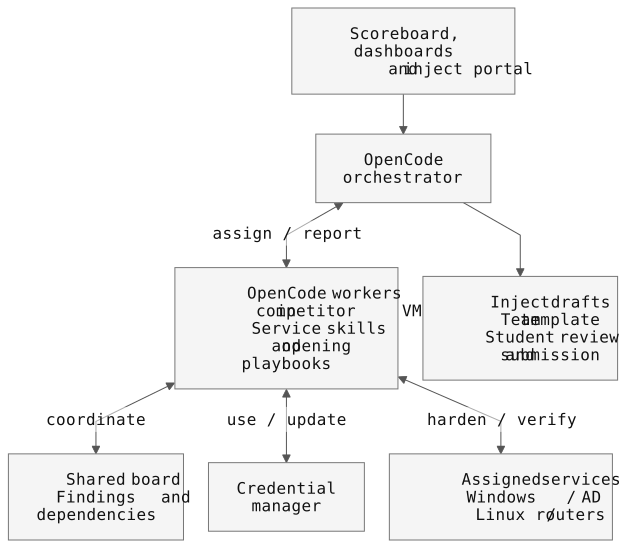
<p>Our plan is to build a lightweight harness around OpenCode, orchestrating a swarm of instances running on the student competitors’ machines to harden a CCDC environment. Since we can’t use paid AI services, we’d use free models available through OpenCode. The orchestrator would itself be an OpenCode instance, with access to the scoring website, service dashboards, and inject portal.</p>

<p>The main features we brainstormed are:</p>

<ol>
  <li>Injects. The orchestrator would complete injects using a template we’d created, gathering relevant findings from the agents. We’d review and submit the responses ourselves to ensure they’re valid.</li>
  <li>Service-specific skills and playbooks. Each OpenCode instance would have skills geared toward its assigned systems: Windows, AD, Linux, routers, etc. It would also have playbooks for tasks like rotating credentials at the beginning of competition. We’d run the instances in VMs, taking advice from <a href="https://blog.krauq.com/post/krauqs-ai-power-user-guide">Krauq’s AI Power User Guide</a>, so their tools and working files stay off our main machines.</li>
  <li>Scoreboard monitoring. The orchestrator would scrape the scoreboard to see which services are down and direct the relevant agents to investigate and restore them.</li>
  <li>A shared discussion board. Agents would share findings and coordinate changes, since some services rely on others. A Linux service using AD authentication, for instance, would need its agent to coordinate with the AD agent before changing the account it uses.</li>
  <li>Credential management. A shared credential manager would be updated whenever an agent rotated credentials, keeping the team and other agents working with the current passwords.</li>
</ol>

<p><a href="/assets/images/road-to-nationals/agent-harness.svg"><img src="/assets/images/road-to-nationals/agent-harness.svg" alt="Mermaid diagram showing the orchestrator, OpenCode workers, service skills, shared discussion board, credential manager, and inject review." /></a></p>

<p><em>High-level architecture, admittedly drawn by AI</em></p>

<h2 id="references">References</h2>

<ul>
  <li><a href="https://osec.io/blog/save-ctfs-fund/">OtterSec: Announcing the Save CTFs Fund</a></li>
  <li><a href="https://kabir.au/blog/the-ctf-scene-is-dead">Kabir Acharya: The CTF scene is dead</a></li>
  <li><a href="https://blog.krauq.com/post/krauqs-ai-power-user-guide">Krauq’s AI Power User Guide</a></li>
</ul>]]></content><author><name>Alex Schneider</name></author><category term="road-to-nationals" /><category term="ccdc" /><category term="blue-team" /><category term="ai" /><category term="opencode" /><category term="competition" /><summary type="html"><![CDATA[What our first WRCCDC Invitational taught us about AI, and how we want to approach the 2027 CCDC season.]]></summary></entry><entry><title type="html">Building Our Practice Lab</title><link href="https://alexsch.dev/road-to-nationals-part-1.html" rel="alternate" type="text/html" title="Building Our Practice Lab" /><published>2026-09-29T00:00:00-04:00</published><updated>2026-09-29T00:00:00-04:00</updated><id>https://alexsch.dev/road-to-nationals-part-1</id><content type="html" xml:base="https://alexsch.dev/road-to-nationals-part-1.html"><![CDATA[<p>I’m Alex, Cornell Cyber’s president for Fall 2026, taking over from Raman. This year, I set a couple of goals for the club: I wanted us to publish blue team tools that anyone could use, and I hoped we could get some CVEs under our belt. I also wanted us to continue placing well in competitions—we won BSidesNYC last year and jumped seven spots in ISTS—including making it to CCDC nationals for the first time. We have to qualify for regionals first, though.</p>

<p>We’re also trying to get Cornell project team status. Last year, our application was denied in favor of CSalt, a team focused on “marine energy solutions.” I still have a hard time understanding that decision, given that we’re Cornell’s only cybersecurity organization. The emphasis on project-based work has made CCDC a harder sell. I find that frustrating given how much work goes into preparing for it, including building this lab.</p>

<p>We bought our first server for Cybear Day 2026, our first public event. We’d planned our own red-vs-blue (RvB) competition, but we hadn’t prepared enough or recruited enough participants, so it didn’t really work out. I will say, I still enjoyed seeing a group of students spend the afternoon together because they were interested in security.</p>

<p>The server barely got used during the event, so afterward we decided to turn it into a practice environment. Members could set up the services they’d eventually defend and get some experience managing the infrastructure themselves.</p>

<p>That server and the PCs donated by <a href="https://cornellcomputerreuse.org/">CCRA</a> make up our entire infrastructure setup at the Radio Club tower. Thanks to CCRA for the PCs and to the Radio Club for giving us somewhere to put them.</p>

<p>[IMAGE: the racks at the Radio Club]</p>

<h2 id="the-windows-side">The Windows Side</h2>

<p>Bill, our vulnerability research and CTF lead, and I handle all of the Windows work. Most of the team works on Linux. I’d prefer working on Linux as well—everything feels so much more intuitive—but someone has to handle Active Directory (AD), and there weren’t many people willing to touch Windows at all.</p>

<p>Last year, I barely had any experience hardening Windows, especially in the rhythm of an RvB competition. My experience centered on some red teaming I’d done at a past job, which I really enjoyed. At our last CCDC, we made the mistake of using heavily AI-generated hardening scripts with cool interfaces and stuff. We barely tested them, and they ended up shooting us in the foot. Some changes disabled compatibility features that services relied on, and we lost availability points as a result. While I don’t think using AI to write scripts is necessarily wrong, a player should be deeply familiar with how their scripts work and should test them thoroughly in a running lab environment.</p>

<p>With that in mind, this year I want to know what each change does before we deploy it. We’ll run the scripts against a domain and check the services afterward. We also need to be able to undo whatever breaks.</p>

<p>I decided on <a href="https://github.com/Orange-Cyberdefense/GOAD">GOAD-Light</a>, a vulnerable Active Directory lab with three Windows machines. It’s kind of similar to what we see in a real CCDC environment, except without the command-and-control implants (C2s) and registry madness. It’s small enough for our hardware and gives us a domain with misconfigurations to fix. It also supports Proxmox, which our server was already running.</p>

<h2 id="running-it">Running It</h2>

<p>Remote access was limited at first, so I used the Proxmox API to stage the installer ISOs directly on the host, then added an SSH forward for shell access.</p>

<p>Packer installed Windows Server 2019 into a template. Terraform then created linked clones, and Ansible configured the domains and services. To be honest, I was expecting a pretty painful process of fixing every Ansible step. A previous attempt to run GOAD on my own machine had been very frustrating.</p>

<p>The template took about 72 minutes to build on our 1.6 GHz Xeons. Once it was ready, Terraform gave me this plan:</p>

<div class="language-text highlighter-rouge"><div class="highlight"><pre class="highlight"><code>Plan: 3 to add, 0 to change, 0 to destroy.
</code></pre></div></div>

<p>The resulting lab looked like this:</p>

<table>
  <thead>
    <tr>
      <th>VM</th>
      <th>Hostname</th>
      <th>Lab IP</th>
    </tr>
  </thead>
  <tbody>
    <tr>
      <td>DC01</td>
      <td>kingslanding</td>
      <td>192.168.56.10</td>
    </tr>
    <tr>
      <td>DC02</td>
      <td>winterfell</td>
      <td>192.168.56.11</td>
    </tr>
    <tr>
      <td>SRV02</td>
      <td>castelblack</td>
      <td>192.168.56.22</td>
    </tr>
  </tbody>
</table>

<h3 id="waiting-for-windows">Waiting for Windows</h3>

<p>It wasn’t all sunshine and rainbows, so I’ll sprinkle in some of the issues I faced. The setup was far more involved than this shows, but I’d rather not bore you with every detail. The first Ansible run failed with:</p>

<div class="language-text highlighter-rouge"><div class="highlight"><pre class="highlight"><code>No route to host
</code></pre></div></div>

<p>Provisioning had started about two minutes after the clones booted. On our hardware, Windows took roughly fifteen minutes to apply its network configuration. I needed to wait for networking and WinRM to become reachable before starting Ansible.</p>

<p>Later, SQL Server Management Studio sat installing for close to five hours. I wasn’t sure whether it was just our really slow hardware or something else interfering with the installation. I realized Defender’s real-time protection was scanning every new file on that lab machine, leading to crazy overhead. Once I disabled it, the installation finished within minutes. GOAD’s configuration called for it to be disabled anyway, but I hadn’t caught that before waiting on the installer.</p>

<p>I also wanted to follow proper homelabbing practices, so I put the VMs on <code class="language-plaintext highlighter-rouge">vmbr1</code>, a bridge with no physical ports. A small container at <code class="language-plaintext highlighter-rouge">192.168.56.1</code> provides DNS, DHCP, and NAT for internet access. The vulnerable machines stay off the physical LAN.</p>

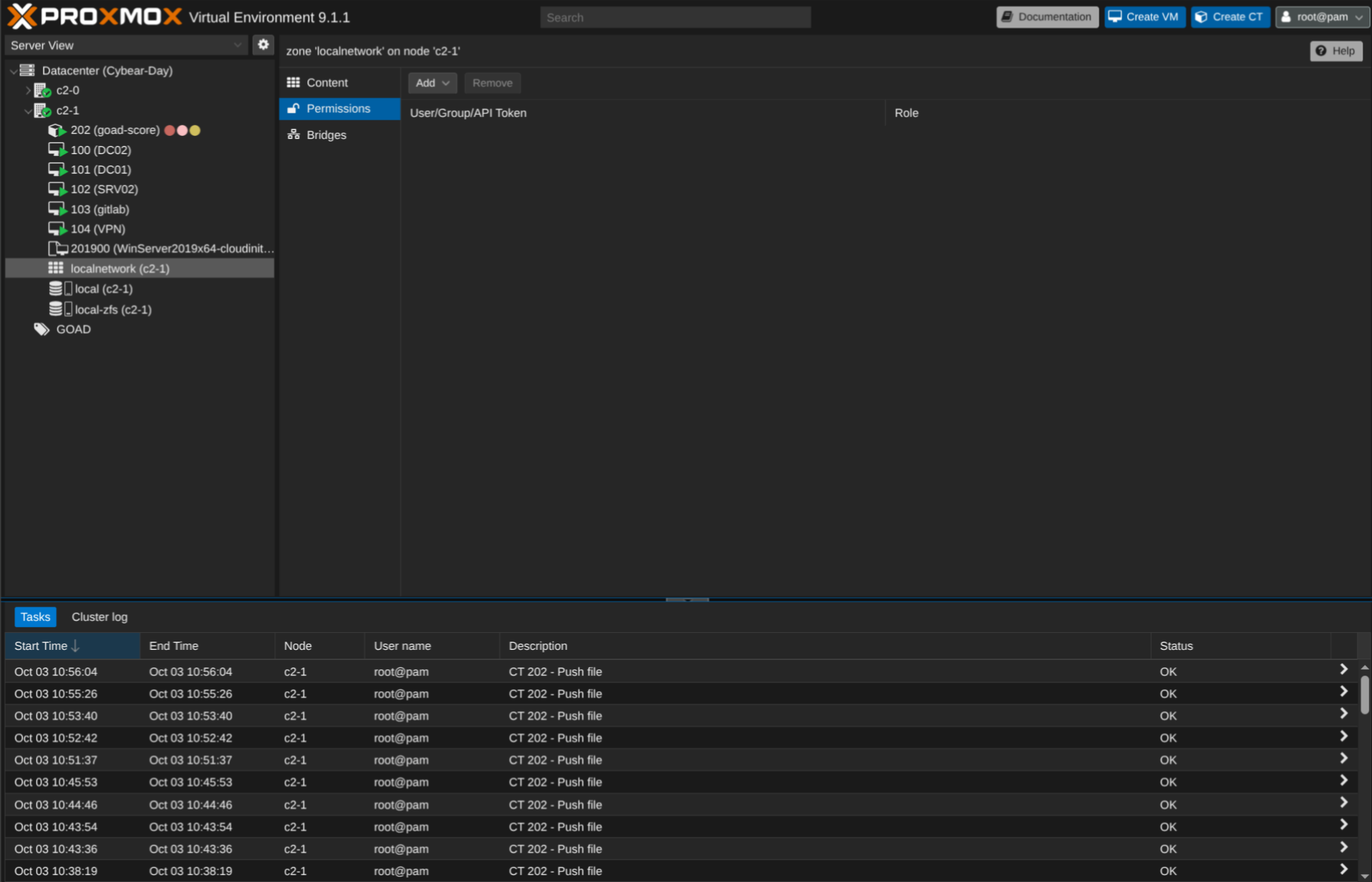
<p><a href="/assets/images/road-to-nationals/proxmox-dashboard.png"><img src="/assets/images/road-to-nationals/proxmox-dashboard.png" alt="Proxmox dashboard listing the GOAD Windows VMs, scoring container, and Windows Server template." /></a></p>

<p><em>The lab VMs and scoring container in Proxmox.</em></p>

<h2 id="checking-the-services">Checking the Services</h2>

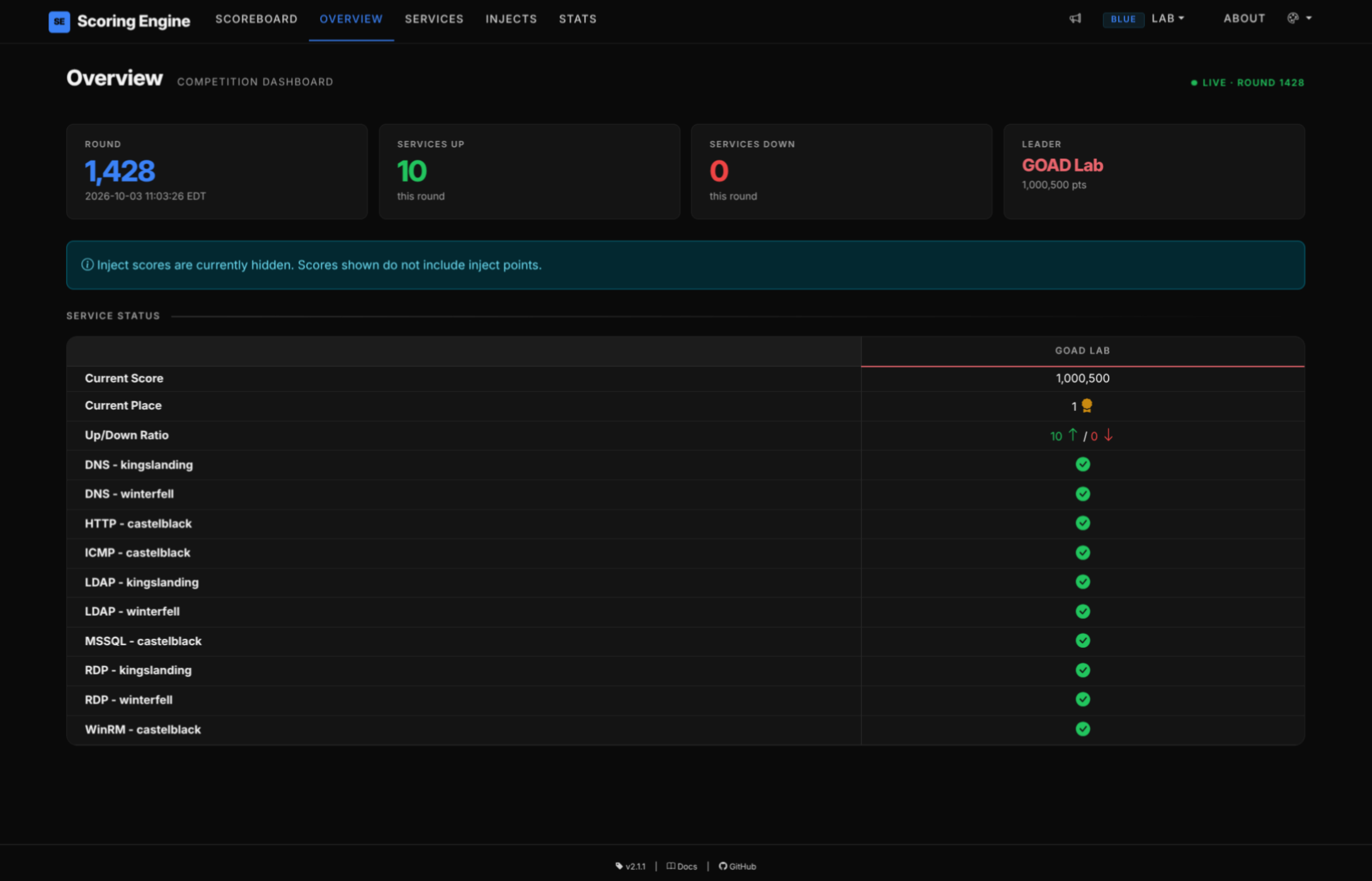
<p>Once the domain was fully up and running, I wanted to make the lab feel more like a competition environment, so I looked into scoring engines. I know most RvB competitions use Quotient for scoring, but I found another option that seemed more actively maintained: <a href="https://github.com/ScoringEngine/ScoringEngine">CCDC ScoringEngine</a>. I deployed it in another container. We have ten checks covering DNS, LDAP, RDP, MSSQL, WinRM, IIS (HTTP), and ICMP, running every 180 seconds.</p>

<p>Getting those checks green took some debugging too. The LDAP checks failed until I used the accounts’ CN-based distinguished names in the bind configuration. Another failure came from an inline YAML mapping: an unquoted comma cut off the base DN in <code class="language-plaintext highlighter-rouge">DC=sevenkingdoms,DC=local</code>.</p>

<p>Reading the individual check output helped separate scoring configuration errors from problems on the Windows machines. Eventually, all ten checks passed.</p>

<p><a href="/assets/images/road-to-nationals/scoring-overview.png"><img src="/assets/images/road-to-nationals/scoring-overview.png" alt="CCDC ScoringEngine overview showing the GOAD Lab with ten services up, zero down, and a green check for every service." /></a></p>

<p><em>All ten checks passing in the scoring dashboard.</em></p>

<p>I saved the working VMs with a snapshot named <code class="language-plaintext highlighter-rouge">working-state</code>. To reset a VM between sessions:</p>

<div class="language-bash highlighter-rouge"><div class="highlight"><pre class="highlight"><code>qm rollback &lt;vmid&gt; working-state
</code></pre></div></div>

<p>We now have a baseline to test our scripts against. In the next post, I’ll discuss what went into creating our Windows hardening scripts.</p>]]></content><author><name>Alex Schneider</name></author><category term="road-to-nationals" /><category term="ccdc" /><category term="blue-team" /><category term="windows" /><category term="proxmox" /><category term="homelab" /><summary type="html"><![CDATA[Building Cornell Cyber's CCDC practice lab with GOAD-Light, Proxmox, and a scoring engine.]]></summary></entry></feed>